Step 1: Create Your Composition
Before you do anything else, it’s extremely important to plan out your scene. First, make sure you’re happy with the overall composition. This will give you a better idea of the scene and will keep you on track toward your goal. It will also make it easier to flesh things out later on. For this closing shot, we were as specific as we could be- we sketched out the landscape and environment all the way down to the placement of the flowers and where each would land. In addition to composition, keep your camera moves in mind; they will effect how the matte is made. For example, if you want a shot that pans horizontally, your matte needs to be wider than normal to accommodate for the panning camera move. The most important thing to consider is the focal point and how it will affect the main elements in the scene. Your focal point is the place in the image where the viewer’s eye goes first. Especially in a short piece, your focal points should be fixed on the main action in the scene.

Step 2: Create a Matte Painting
Once you have your composition laid out, it’s time for matte painting. When building a matte painting, we find it helpful to research and reference hunt before painting our first pixel. For this shot, we wanted to make sure the landscape and atmosphere in Burma was captured as realistically and with as much emotional impact as possible. That perspective on our end-goal made creating a matte painting a much more fluid process. With your compositional layout as your guide, begin to model the photos into a more finished matte. Start placing objects at the focal points and main areas. I’ve always found that when doing this, it’s better to work additively by forming broad sweeps before you begin refining the details. Your comp reference will be helpful in articulating the details, colors and overall style of things that you could easily overlook if you only go with what’s in your head.

Step 3: Break the Matte into Layers
Group the layers so that the different elements of the matte are kept together. To create paralax, the matte needs to be broken up in slices from its farthest to nearest elements. Group the elements on the same distance plane but keep all of the planes separate, particularly any particle or glow effects you’ve created. In this example, those effects include the low-lying fog. These elements will be placed in 3D space later on.

Step 4: Import the Matte into Maya and Set Up the Scale of the Landscape
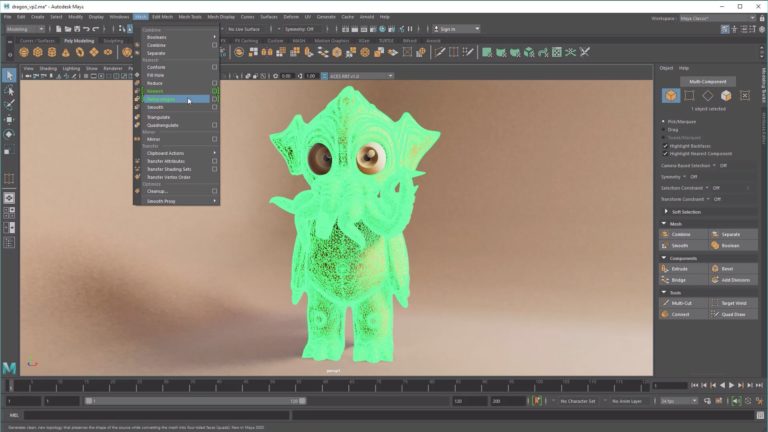
Import the matte layers on surface shaders into Maya and place each one on a plane. Space the planes based on the distance they should be from each other. Place a camera in front of the closest plane. This will be your render camera. While you look through the render camera, the more distant objects will be smaller. You’ll also need to scale the farther elements up so they are the correct size in the matte painting.


Step 5: Use Camera Projection to Set Up the 3D Elements and Replace Your Foreground
We created our matte with a foreground hill that falls off into the mid-ground. Since it is quite a bit closer to the viewer, it needs to have a bit more detail and shape to it. To do something similar, you must make a basic 3D shape of the ground with the 2D shape in the matte. Using the matte as your camera’s background image, model the general shape of the foreground hill.
Step 6: Animate Camera and Foreground Elements and Make Particle Systems for Background Elements
Once you’ve laid down the scene foundation and worked out the foreground and scale, start placing the objects into the scene. Again, use the layout you created in the first step as your reference for here. Animate the camera first and then move your objects (flowers in our project), based on the camera view. You can create your particle systems by using emitters that render as single pixel particles deep in the background. They are so far away from the camera that there’s no need to make them into mesh objects.

Step 7: Set Up Shading, Lighting, and Render the Scene
When you begin to set up the lighting, it’s important to mimic the lighting in the matte painting as much as possible. In this case, the sun is in the sky facing the camera. A bright rim light and fairly dull front side is the closest match to the matte’s lighting. You’ll also need to set up render layers at this point. This scene is very heavy because of all of the falling flowers. The easiest way to render it is to break it in to multiple scenes and put them back together in the AE comp. Separated, the animated objects, the still grounded foreground objects, and the background objects render out without any problems. Here’s the list of the layers we rendered for the flowers: beauty, diffuse, specular, shadows, veins, translucency, subsurface scattering, ambient occlusion, z-Depth, normals, RGB lighting, RGB mattes and motion vectors. All of these layers helped contribute to the look and level of control we had in the compositing phase.
Step 8: Layout Your Matte Painting and Foreground Projection in AE and Set Up a 3D Camera
In Maya, duplicate the render camera and make sure it is placed in the root structure of the outliner above any groups or parent hierarchy. Parent Constrain (Animation Menu>Constrain>Parent) the duplicated camera to the original one so that it maintains the same animation as your original render camera. The duplicated camera’s key frames need to be baked so that it can be used in the composite. Go to the Curves menu in Maya’s graph editor and click the option to bake keys. This will make a keyframe for every frame in your sequence. Import the layered matte painting file into After Effects.
Step 9: Composite Elements and Add Effects
Piece all the rendered passes together in After Effects. Import the 3D camera into the composition. Once the camera is in the scene, 2D images can be placed into the comp by turning them into 3D objects via the 3D layer button. Objects such as grass, rocks and leaves can be positioned into the composite using this 3D camera technique. To create the sky lighting effect, try using a light wrap plug-in. It will mold the objects in the scene together and make them seem more coherent.

Step 10: Tweak Your Depth of Field and Motion Blur– Then Render
Both depth of field and motion blur are essential to making a realistic looking scene. The After Effects plug-in Frischluft Lenscare was used for depth of field and RE:Vision Effects ReelSmart Motion Blur for motion blur. For Depth of field, it’s essential to render out a Z-depth pass from Maya. The plug-in will use Z-depth to determine the distance away from camera and blur. Don’t forget a bit of grain on top to bring it all together. Hit render and take it easy.

Tools Used: Autodesk Maya; Adobe After Effects; Trapcode Particular; AE Plug-Ins: Frischluft Lenscare and RE:Vision Effects ReelSmart Motion Blur

Your Guide

David Hill
Lead Artist
Shilo
Lead Artist
Shilo
Shilo is a creative production company representing a group of filmmakers led by directors Jose Gomez and Andre Stringer. Internationally known for creating original and commissioned work, Shilo’s deeply held passions for design-infused storytelling and innovative application of live-action, design and animation techniques deliver breakthrough experiences for screen
DAVID SAYS KEEP IN MIND…
Shilo West: 2010 Jimmy Durante Blvd. Suite 224, Del Mar, CA 92014, ph: 858-793-9055, fax: 858-793-9066; Santino Sladavic, Executive Producer. Shilo East: 12-16 Vestry St., 4th Floor, New York, NY 10013, ph: 212-219-4700, fax: 212-219-4799; Tracy Chandler, Executive Producer (tracy@shilo.tv).
Shilo
Did you enjoy this article? Sign up to receive the StudioDaily Fix eletter containing the latest stories, including news, videos, interviews, reviews and more.






After Effects Tutorials